Rapid Spanning Tree Protocol (RSTP)
Rapid Spanning Tree Protocol (RSTP) —
Overview and Motivation
Classic Spanning Tree Protocol (STP) can be quite slow, taking up to 50 seconds for the network to converge after a change in topology. Rapid Spanning Tree Protocol (RSTP) improves this time dramatically, only taking a few seconds to respond to changes in the network.
Key takeaway: RSTP is superior to classic STP because it converges much faster after a topology change.
Cisco's Implementation: Rapid Per-VLAN Spanning Tree (Rapid PVST+)
Cisco's version of RSTP is called Rapid Per-VLAN Spanning Tree (Rapid PVST+). This is the default STP mode on most modern Cisco devices.
Importance for the CCNA Exam
The CCNA exam topics only mention Rapid Spanning Tree Protocol (RSTP). However, understanding classic STP first provides a strong foundation that makes learning RSTP much easier.
RSTP & STP Differences
| Classic STP | Rapid STP | |
|---|---|---|
| Convergence time up to 50 seconds | Convergence in a few seconds | |
| Slow response to topology changes | Fast response to topology changes | |
| Older standard | Newer, superior standard; default on most devices today |
Final note: Because RSTP is superior to classic STP, it is now the default on most devices, and the CCNA exam focuses exclusively on RSTP.
Rapid Spanning Tree Protocol (RSTP) — Versions of Spanning Tree
Overview of STP Versions
| IEEE Standard (Industry Standard) | Cisco Proprietary (Upgrade) | ||
|---|---|---|---|
| 802.1D — Classic STP | PVST+ — Per-VLAN Spanning Tree Plus | ||
| 802.1w — Rapid STP (RSTP) | Rapid PVST+ — Rapid Per-VLAN Spanning Tree Plus | ||
| 802.1s — MSTP (Multiple Spanning Tree Protocol) | (No Cisco proprietary version — Cisco runs the industry standard 802.1s) |
802.1D — Classic Spanning Tree Protocol (STP)
- The original spanning tree protocol; originally published in 1990 (originally created in 1985 before being standardized)
- All VLANs share one STP instance
- Cannot load balance since there is only one instance, we cannot block different ports in each VLAN to achieve load balancing
PVST+ — Per-VLAN Spanning Tree Plus
- Cisco's upgrade to 802.1D
- Each VLAN has its own STP instance
- This is why commands required the VLAN number (e.g., spanning-tree vlan 1 root primary) — a separate STP instance runs for each VLAN
- Can load balance we can block different ports in each VLAN, in each STP instance, and use network bandwidth more effectively (no connections go totally unused, just waiting for another connection to fail)
- Note: Before PVST+, Cisco developed regular Per-VLAN Spanning Tree, which only supported ISL trunk encapsulation (no dot1q). This version is no longer relevant since everyone uses dot1q for trunk encapsulation these days.
Why Rapid STP Was Needed
Classic STP and PVST+ are quite slow:
Max Age timer: 20 seconds
Listening state: 15 seconds
Learning state: 15 seconds
Total: Up to 50 seconds to respond to changes in the network
That's simply not fast enough for modern networks.
802.1w — Rapid Spanning Tree Protocol (RSTP)
- Much faster at converging and adapting to network changes than 802.1D
- However, just like 802.1D, the industry standard RSTP runs only one STP instance, shared by all VLANs
- Cannot load balance
Rapid PVST+ — Rapid Per-VLAN Spanning Tree Plus
- Cisco's upgrade to 802.1w
- Features the improved speed of rapid STP
- Runs a separate STP instance for each VLAN
- Can load balance by blocking different ports in each VLAN, just like PVST+
- This is the version Cisco switches run and the version mentioned in the CCNA exam topics
- This is the version we'll be focusing on
802.1s — Multiple Spanning Tree Protocol (MSTP)
-
Uses modified RSTP mechanics
-
Can group multiple VLANs into different instances
- Example: 10 VLANs VLANs 1–5 in Instance 1, VLANs 6–10 in Instance 2
-
First industry standard version of STP that allows load balancing
-
Superior to Cisco's Rapid PVST+ for large networks:
- If you have 200 VLANs, configuring primary and secondary root bridges in each VLAN is a lot of work
- With MSTP, simply assign VLANs 1–100 to Instance 1, VLANs 101–200 to Instance 2, then configure primary and secondary root bridges for each instance — much easier to configure and manage
-
Cisco has not developed their own version of MSTP; Cisco devices run the industry standard 802.1s
-
Best for large networks with many VLANs
Summary: When to Use What
| Network Size | Recommended Version | |
|---|---|---|
| Small to medium networks (without a huge number of VLANs) | Rapid PVST+ (Cisco's version) | |
| Large networks (many VLANs) | MSTP (802.1s) |
Note: All of the information covered applies to the industry standard 802.1w, but that's not the version that runs on Cisco switches. Since you already understand classic STP and PVST+, it will be much easier to learn rapid STP and rapid PVST+ by comparing it to the previous versions.
Cisco's Summary of RSTP
- RSTP is not a timer-based spanning tree algorithm like 802.1D
- RSTP offers an improvement over the 30 seconds or more that 802.1D takes to move a link to forwarding
- The heart of the protocol is a new bridge-bridge handshake mechanism, which allows ports to move directly to forwarding
Key difference: 802.1D uses long timers to determine when it's safe to move to the next state (these timers are quite long to ensure no loops are accidentally created when a port starts forwarding). RSTP instead uses a handshake mechanism switches actively negotiate with other switches and move ports immediately to the forwarding state if appropriate.
Important Note on Terminology
- RSTP and Rapid PVST+ will be used interchangeably throughout the lecture
- Cisco's Rapid PVST+ operates the same as RSTP, but with the addition of a separate instance for each VLAN
Similarities Between STP and RSTP
RSTP is not a "revolution" of STP, just an "evolution". It made major improvements to speed up STP but didn't change it completely.
-
- Same purpose blocking specific ports to prevent Layer 2 loops
-
- Root bridge election same rules as STP (switch with the lowest bridge ID becomes the root bridge)
-
- Root port election same rules as STP (interface with the lowest root cost becomes the root port, with the same tie-breakers: neighbor bridge ID, then neighbor port ID)
-
- Designated port election same rules as STP (the interface on the switch with the lowest root cost becomes designated; if there is a tie, the switch with the lowest bridge ID sets its interface to designated)
RSTP Differences — Port Costs, States, and Roles
Updated Port Costs
Classic STP defines port speeds up to 10 Gbps (port speeds faster than this are all given a cost of 1). RSTP's cost values were expanded to accommodate faster speeds:
| Speed STP Cost RSTP Cost |
|---|
| -------------------------------- |
| 10 Mbps | 100 | 2,000,000 |
|---|---|---|
| 100 Mbps | 19 | 200,000 |
| 1 Gbps | 4 | 20,000 |
| 10 Gbps | 2 | 2,000 |
| 100 Gbps | x | 200 |
| 1 Tbps | x | 20 |
| 10 Tbps | x | 2 |
Use the flashcards to remember the port costs of both classic STP and rapid STP.
Simplified Port States
| STP Port State | Send/Receive BPDUs | Frame forwarding (regular traffic) | MAC address learning | Stable/ Transitional |
|---|---|---|---|---|
| Blocking | NO/YES | NO | NO | Stable |
| Listening | YES/YES | NO | NO | Transitional |
| Learning | YES/YES | NO | YES | Transitional |
| Forwarding | YES/YES | YES | YES | Stable |
| Disabled | NO/NO | NO | NO | Stable |
Classic STP has five port states: blocking, listening, learning, forwarding, and disabled. RSTP simplifies these to just three port states by combining states:
- Blocking and disabled → combined into Discarding
- Listening → simply not used in RSTP (also falls under Discarding)
- Learning and forwarding → remain unchanged
| STP Port State | Send/Receive BPDUs | Frame forwarding (regular traffic) | MAC address learning | Stable/ Transitional |
|---|---|---|---|---|
| Discarding | NO/YES | NO | NO | Stable |
| Learning | YES/YES | NO | YES | Transitional |
| Forwarding | YES/YES | YES | YES | Stable |
| RSTP State | Description |
|---|---|
| Discarding | Port is administratively disabled (shutdown command applied) — previously the disabled state. OR, port is enabled but blocking traffic to prevent Layer 2 loops — previously the blocking state. Also replaces the listening state. |
| Learning | (Same as classic STP) |
| Forwarding | (Same as classic STP) |
Port Roles
The three original port roles in classic STP are root, designated, and non-designated. In RSTP:
Unchanged Roles
- Root port remains the same; the port closest to the root bridge (i.e., the port with the lowest root cost) becomes the root port. The root bridge is the only switch that doesn't have a root port.
- Designated port remains the same; the port on a segment (another name for a collision domain) that sends the best BPDU is that segment's designated port. There can only be one designated port per segment. The other port on the segment is either a root port or a nondesignated port (in classic STP).
Changed Role
- Non-designated → divided into two separate roles in RSTP:
- Alternate port role
- Backup port role
RSTP Port Roles — Alternate and Backup Ports & STP Features
Alternate Port Role
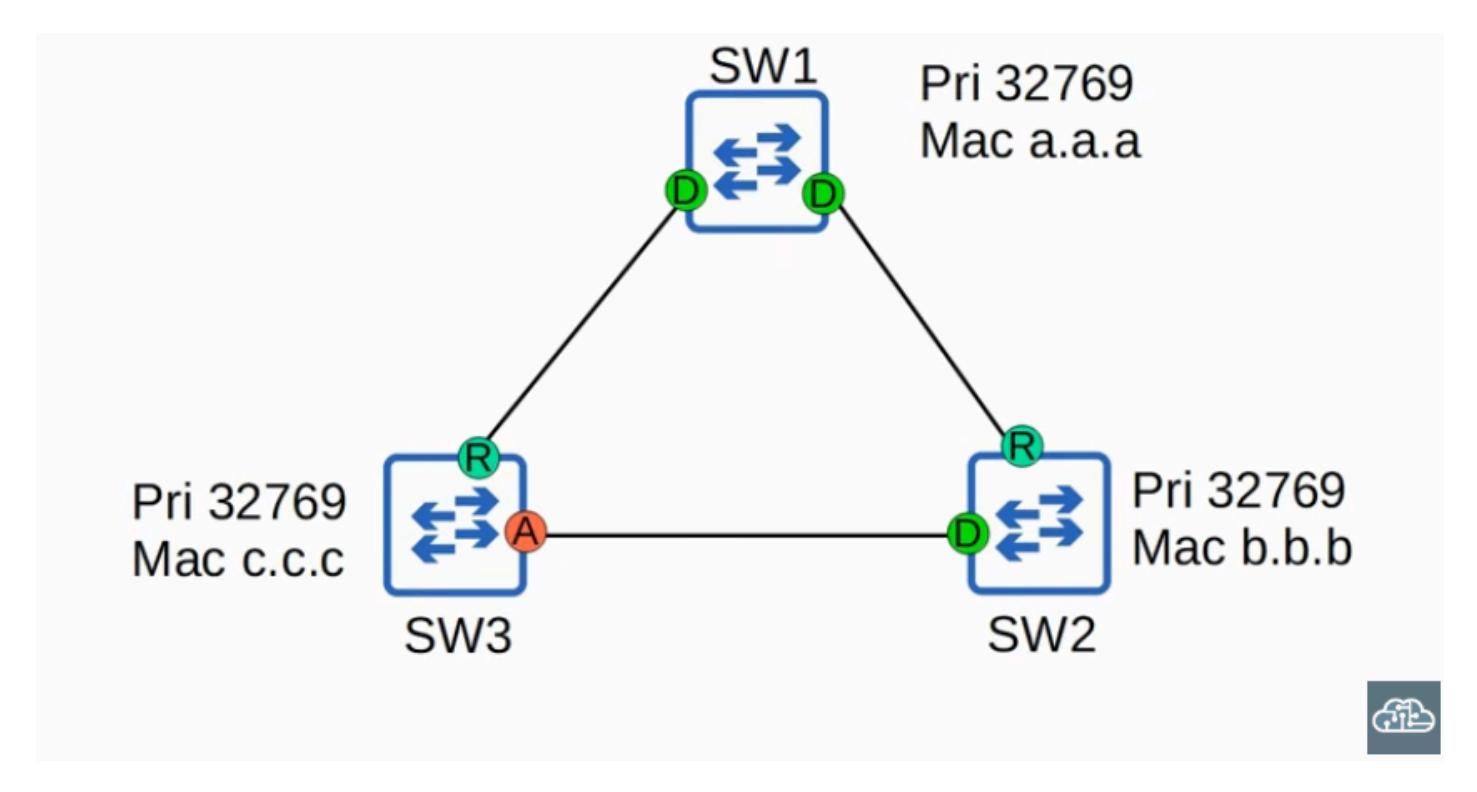
- A discarding port that receives a superior BPDU from another switch
- This is the same as what you already learned about blocking ports in classic STP
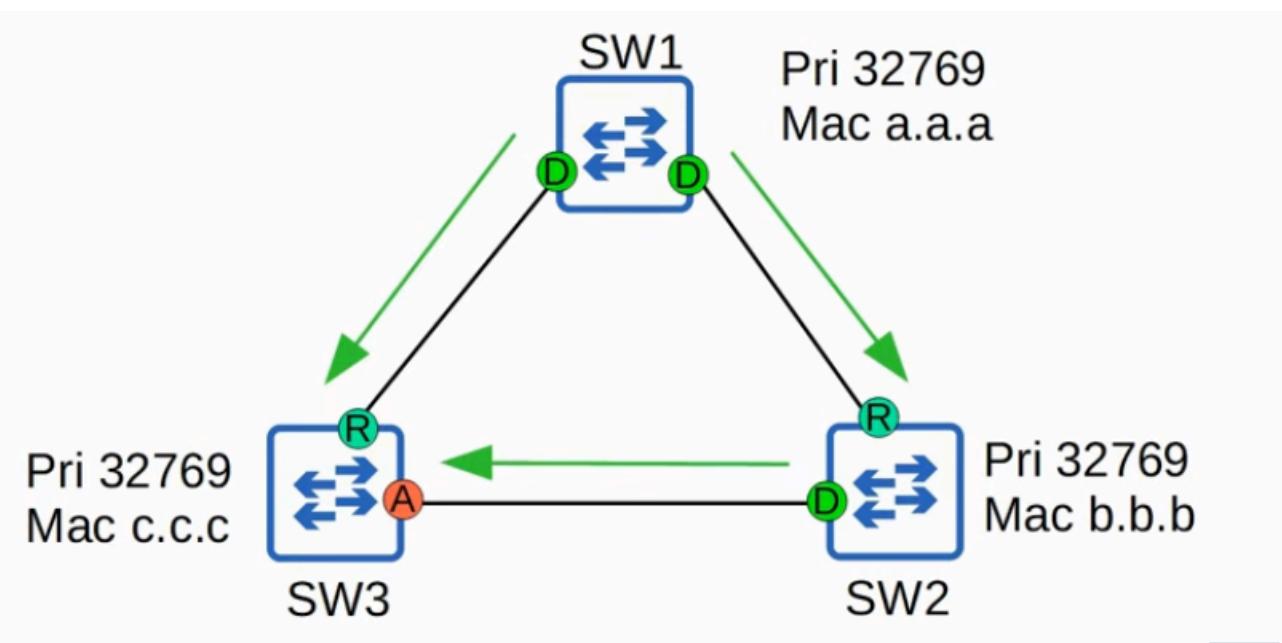

- In the example topology: SW1 is the root bridge. SW3 receives a superior BPDU from SW2 (because SW2's bridge ID is lower than SW3's). So SW2's interface is designated, and SW3's interface becomes an alternate port.
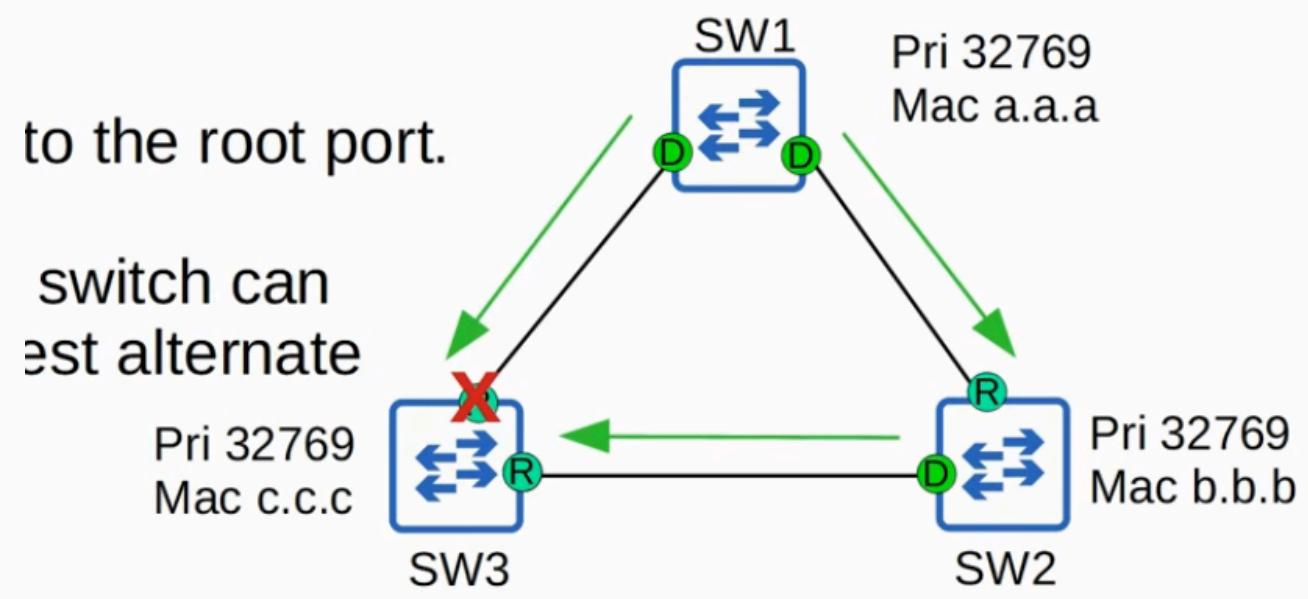
- An alternate port functions as a backup to the root port

-
If the root port fails, the switch can immediately move its best alternate port to forwarding as the new root port
-
This move happens with no transitional states
-
This immediate move to forwarding state functions like a classic STP optional feature called UplinkFast
- Because it is built into RSTP, you do not need to activate UplinkFast when using RSTP or Rapid PVST+
UplinkFast
- Allows a switch to immediately move an alternate port to forwarding if the root port fails
- In classic STP, this had to be explicitly configured
- In RSTP, this functionality is built in and operates by default no configuration needed
BackboneFast
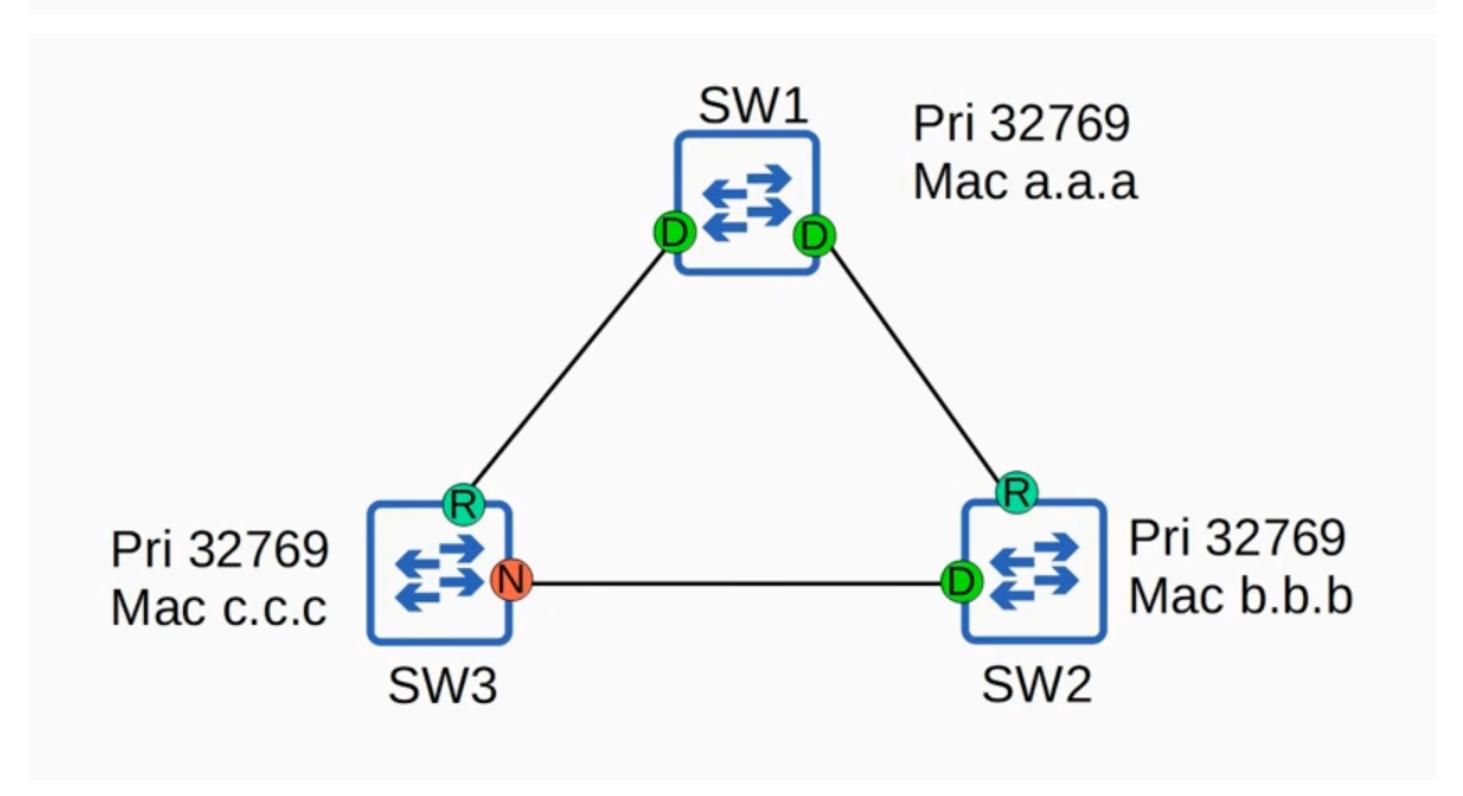
Helps a switch quickly recover when it loses its connection to the root bridge
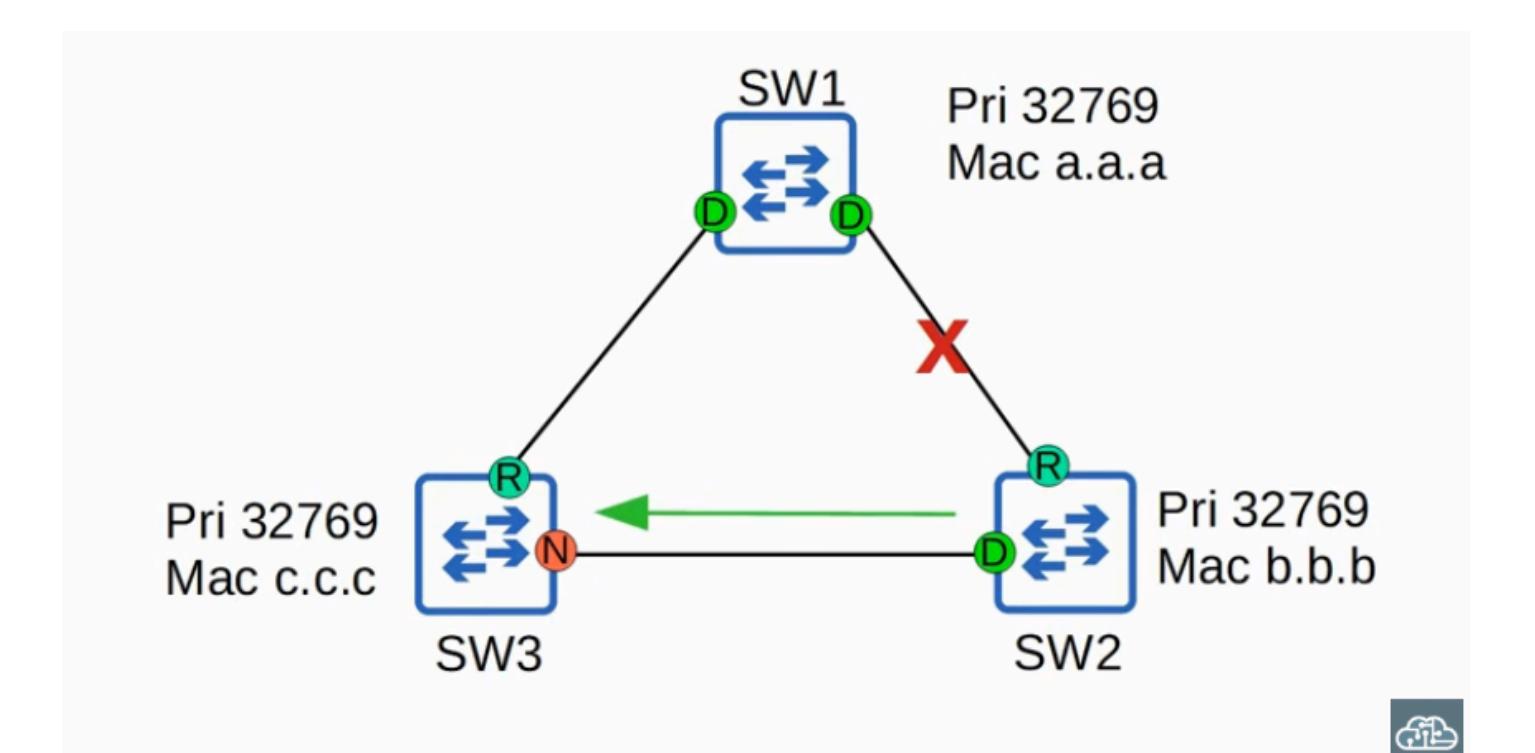
Example: SW2's root port is cut off, so it stops receiving BPDUs from the root bridge and assumes it is the root bridge, sending its own BPDUs to SW3. SW3 receives BPDUs from both SW1 and SW2, but SW2's BPDUs are inferior (higher bridge ID).
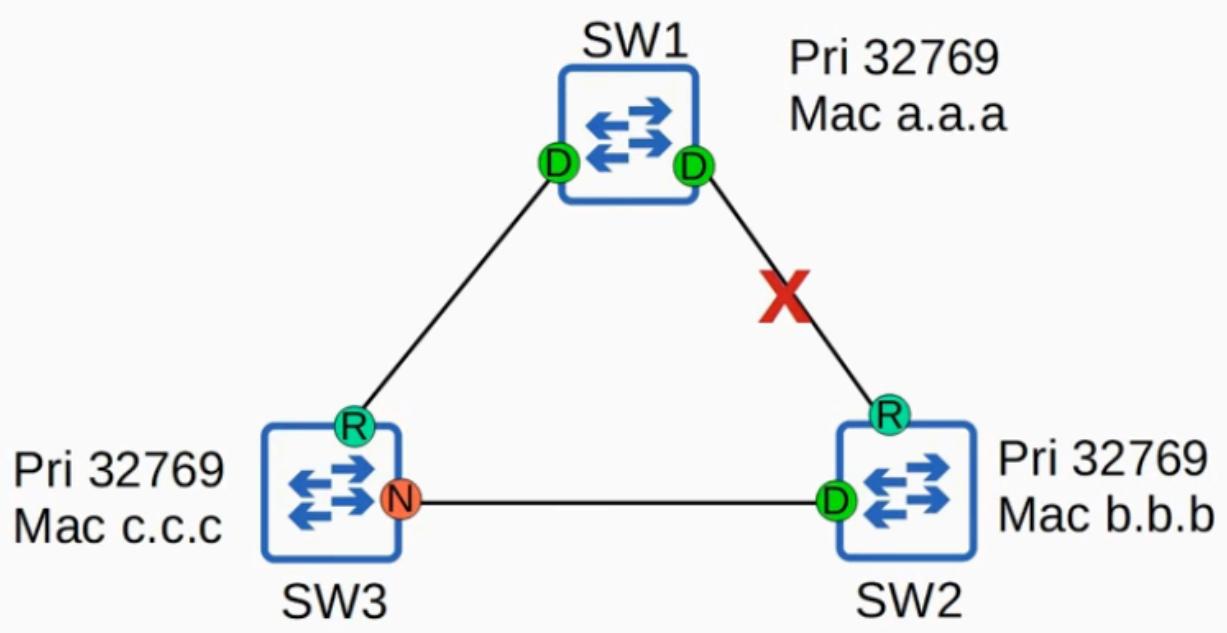

Without BackboneFast: SW3 would ignore SW2's inferior BPDUs until its non-designated port
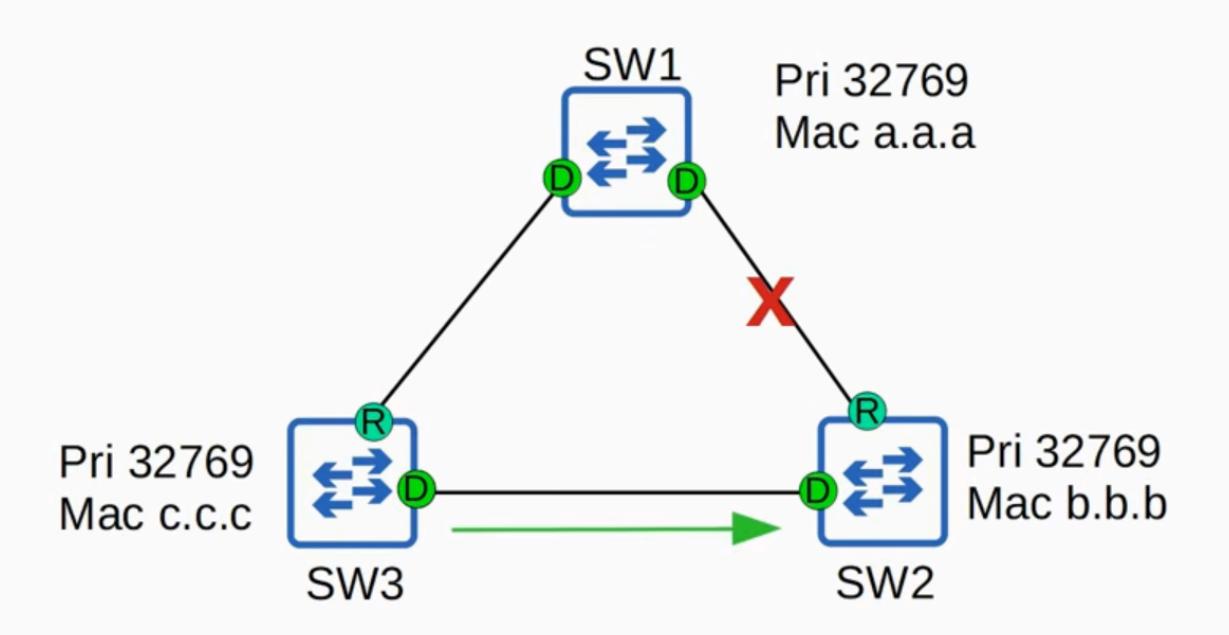
in classic STP finally changes to forwarding and forwards the superior BPDUs to SW2 which then accepts SW1 as its Root Bridge again.
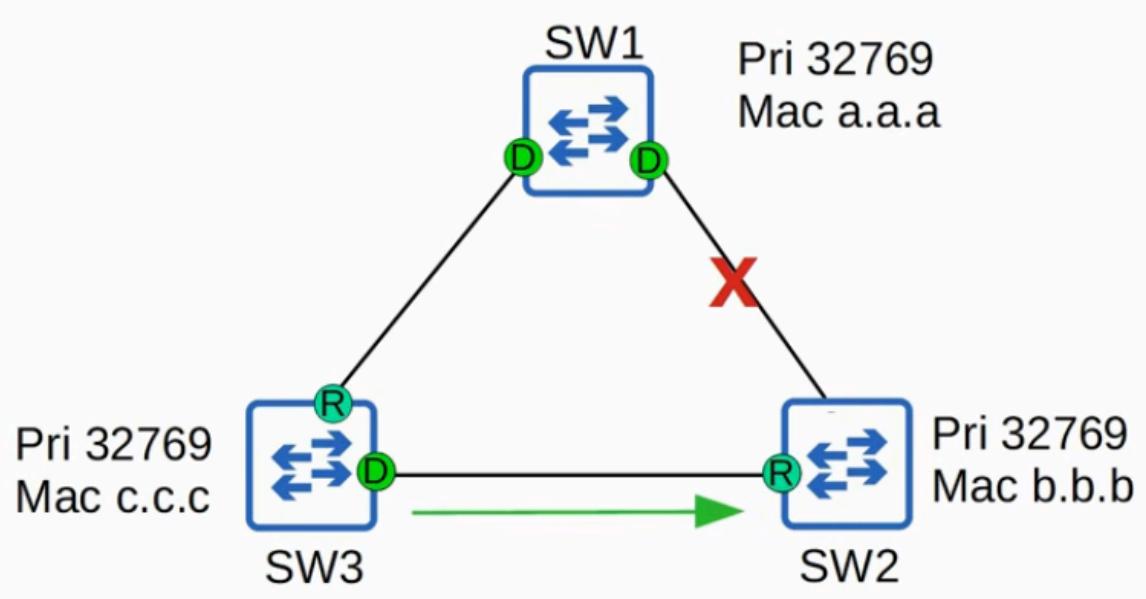

- With BackboneFast: SW3 expires the max age timer on that interface and rapidly forwards the superior BPDUs to SW2, so SW2 accepts SW1 as its root bridge again
- In classic STP, this had to be explicitly configured
- In RSTP, this functionality is built in and operates by default no configuration needed
Summary: UplinkFast & BackboneFast
| Classic STP | RSTP | |||
|---|---|---|---|---|
| Configuration required? | Yes — must be configured on the switch | No — built in and operate by default | ||
| CCNA requirement | Not necessary to know how to configure them | Know their names and basic purpose: help blocking or discarding ports move to forwarding without delay |
Neither UplinkFast nor BackboneFast are on the CCNA exam topics list, but be aware that their functionality is built into RSTP — you may get asked about that on the exam.
Backup Port Role
- A discarding port that receives a superior BPDU from another interface on the same switch
- This only happens when two interfaces are connected to the same collision domain, via a hub
Topology for Backup Port Role:
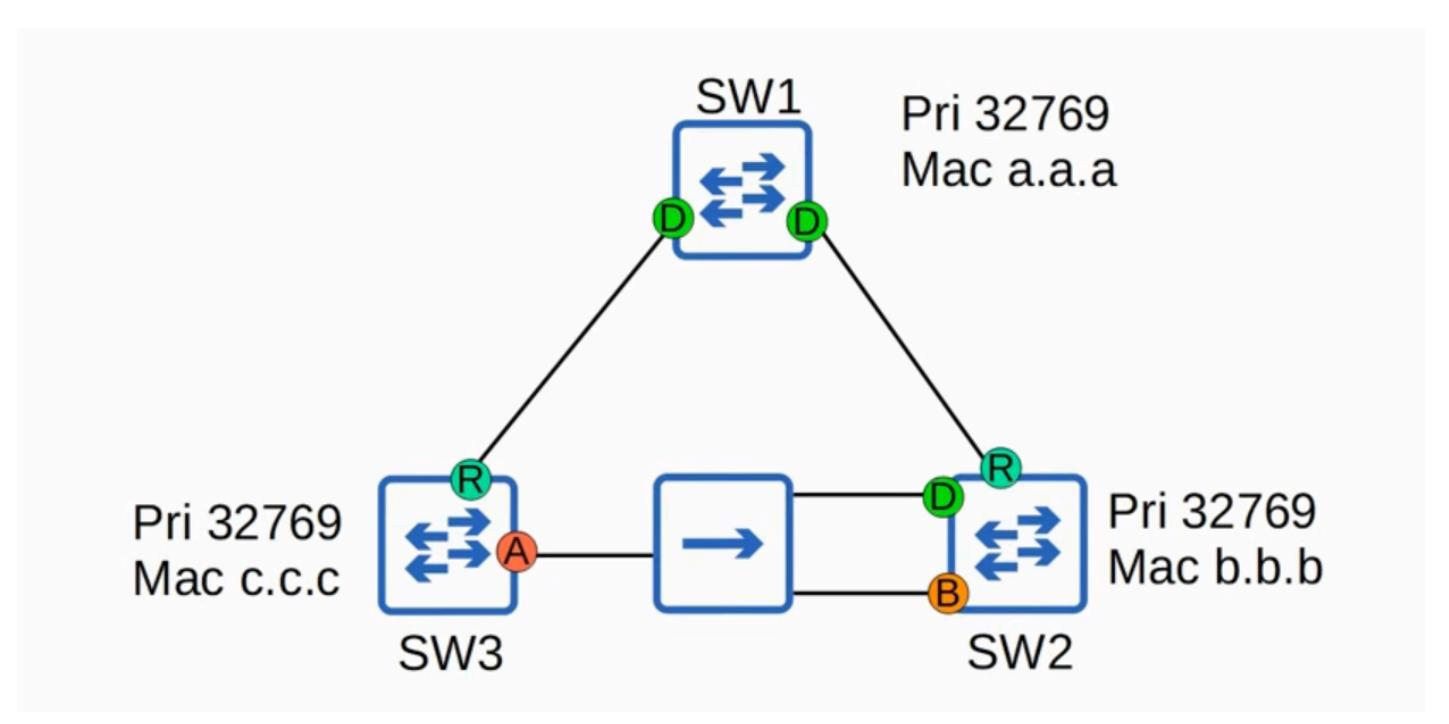
How It Works
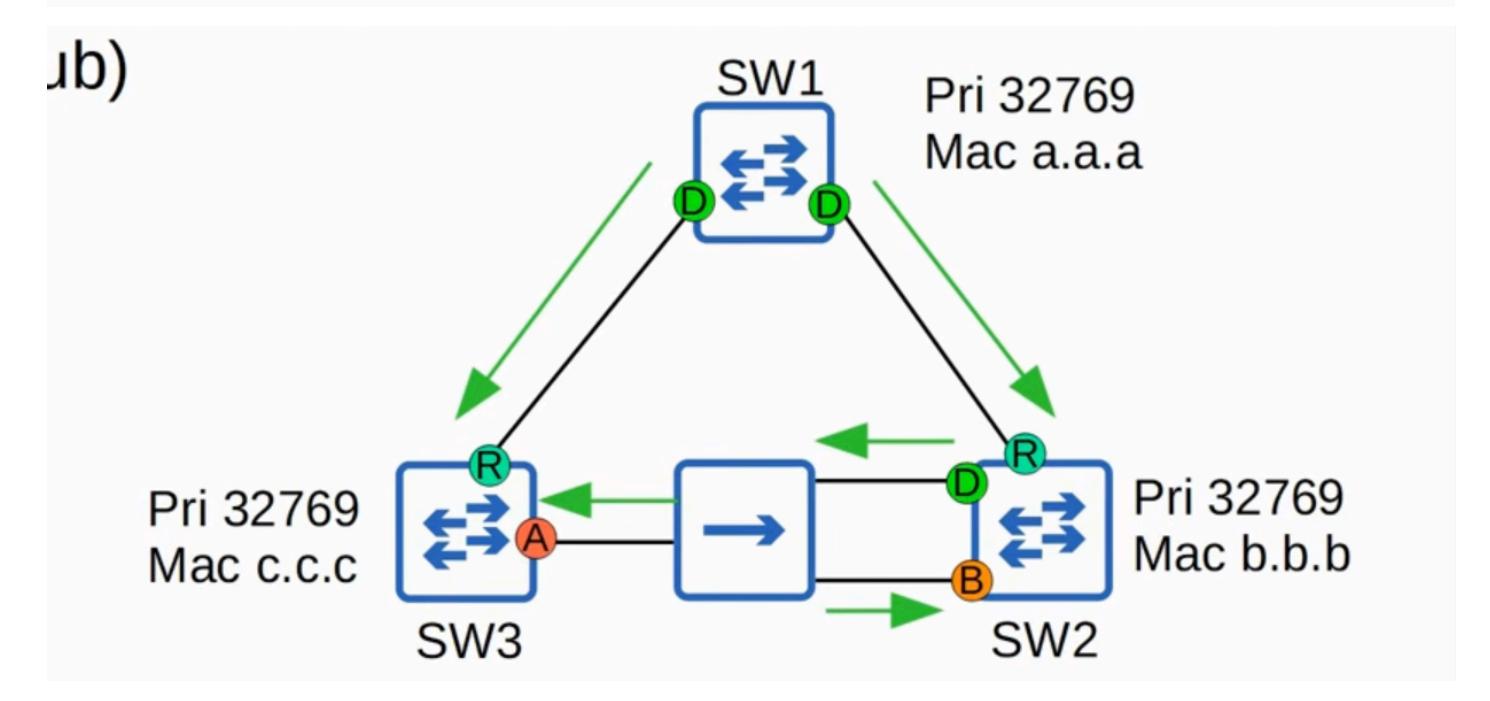
- When an ethernet hub is connected between two switches (e.g., SW2 and SW3), the BPDU sent out of SW2's designated port is flooded by the hub
- SW2 receives that same BPDU on a different interface that's why this interface is a backup port, not an alternate port
- Since hubs are not used in modern networks, you will probably not encounter an RSTP backup port in practice, but it's still something you should know
Backup Port Function
- Functions as a backup for a designated port
- If the designated port fails, the backup port immediately begins forwarding traffic as a designated port
Designated vs. Backup Selection
- When two interfaces on the same switch are connected to the same collision domain (via a hub):
- The interface with the lowest port ID is selected as the designated port
- The other interface becomes the backup port
RSTP Port Roles — Quiz Question
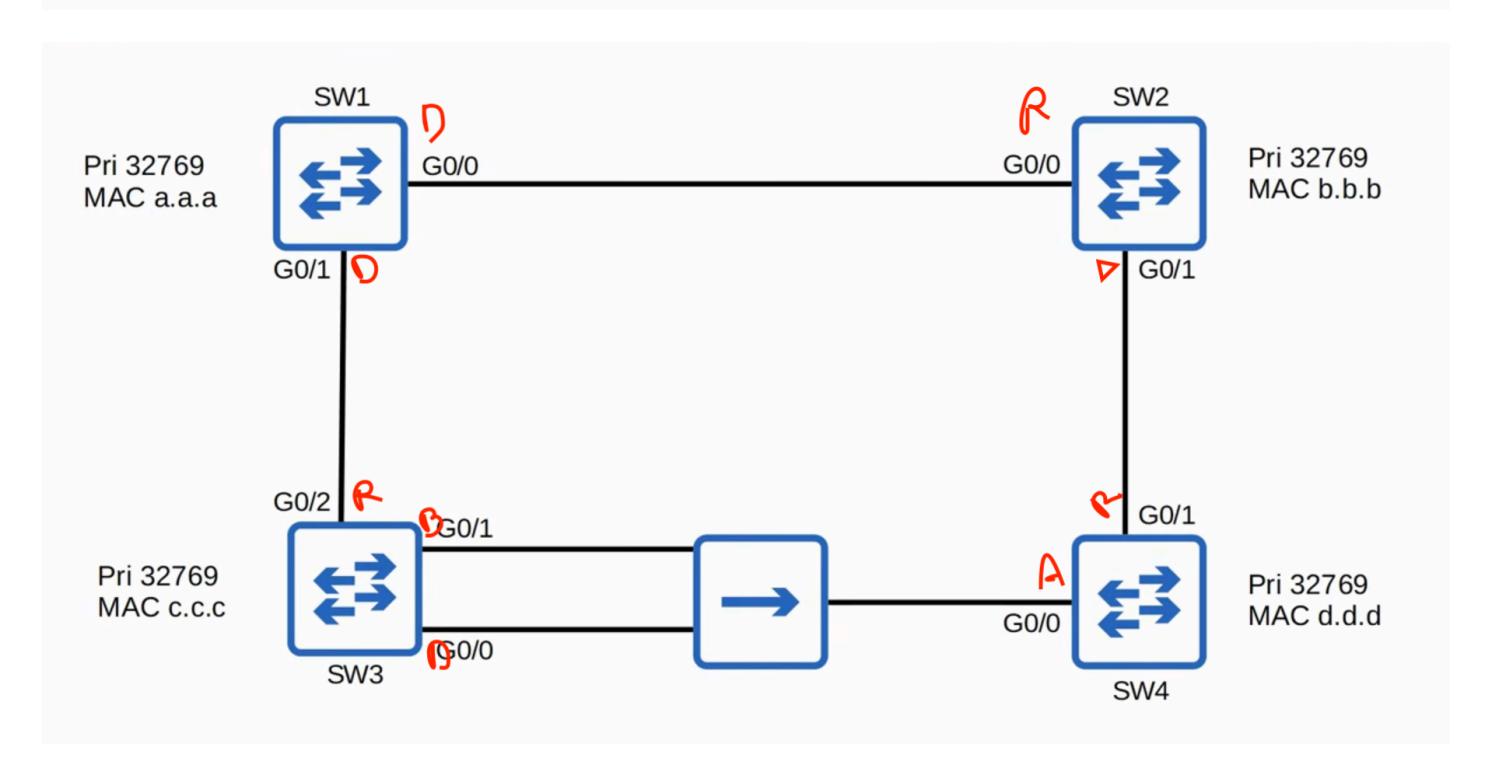
Identify the root bridge and the RSTP port role of each switch interface in the network. Note: The hub does not participate in spanning tree — hubs aren't sophisticated enough and simply flood all frames they receive.
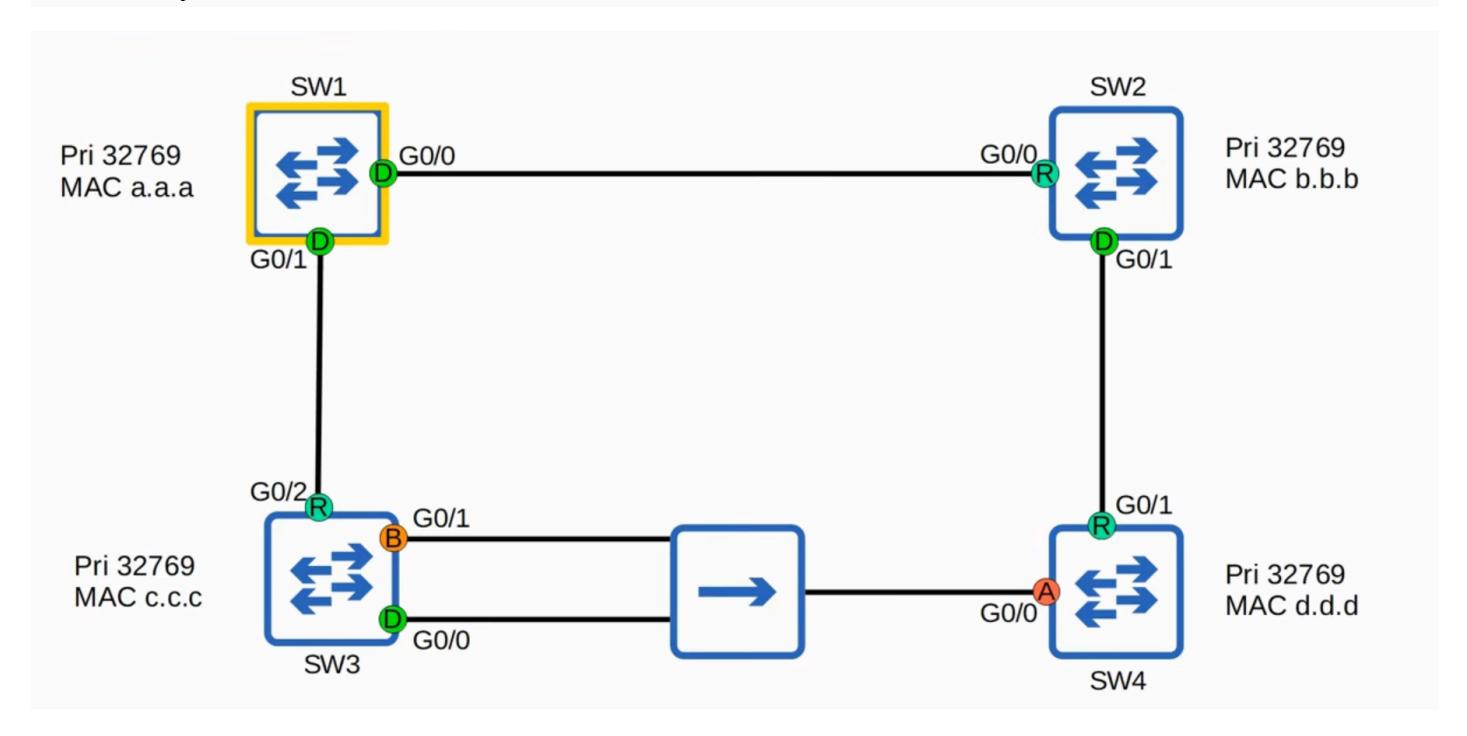
Root Bridge
SW1 is the root bridge — all switches have the same priority, and SW1 has the lowest MAC address
SW1 (Root Bridge)
Both interfaces are designated ports
Root Ports
- SW2 G0/0 root port (lowest root cost)
- SW3 G0/0 root port (lowest root cost)
- SW4 G0/1 root port
- The hub doesn't participate in STP, so it doesn't add any cost to the BPDU
- SW4 chose G0/1 over G0/0 because the neighbor bridge ID is lower via G0/1 (SW2 has a lower MAC address than SW3)
Designated Ports
- SW2 G0/1 designated (connected to SW4's G0/1)
- SW3 G0/0 designated (SW3 has a lower root cost than SW4; G0/0 has the lower port ID, so it is the designated port in this collision domain)
Backup Port
SW3 G0/1 — backup port (receives a superior BPDU with the lower port ID from the same switch)
Alternate Port
SW4 G0/0 — alternate port (receives a superior BPDU from a different switch)
RSTP — CLI Verification and Compatibility
Verifying RSTP in the CLI

- Three STP modes available on a Cisco switch: MST, PVST, and Rapid-PVST
- Rapid-PVST is the default on modern Cisco switches, so you probably won't have to use the command, but it can be entered manually:
- spanning-tree mode rapid-pvst
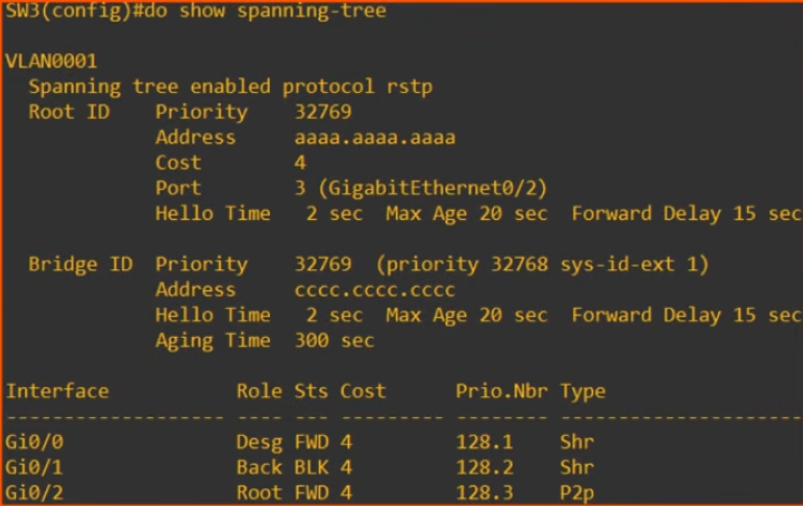
- Use show spanning-tree to confirm:
- Previously with classic STP, it displayed 'ieee'
- With RSTP, it displays 'Spanning tree enabled protocol rstp'
- Although it says 'rstp', it is actually Cisco's Rapid PVST+ running
CLI Output Notes
In the show spanning-tree output:

| -11 | |||||
|---|---|---|---|---|---|
| Gi0/0 | Desg | FWD | 4 | 128.1 | Shr |
| Gi0/1 | Back | BLK | 4 | 128.2 | Shr |
| Gi0/2 | Root | FWD | 4 | 128.3 | P2p |
SW3's G0/1 interface shows the 'backup' role
| Gi0/0 | Altn | BLK | 4 | 128.1 | P2p | |
|---|---|---|---|---|---|---|
| Gi0/1 | Root | FWD | 4 | 128.2 | P2p |
- SW4's G0/0 interface shows the 'Alternate' role
- The status is listed as BLK (blocking) in the output, even though the actual state name in rapid STP is discarding
RSTP and Classic STP Compatibility
- Rapid STP is compatible with classic STP
- If a rapid STP-enabled switch has an interface connected to a classic STP-enabled switch, that specific interface will operate in classic STP mode:
- Same timers
- Same blocking → listening → learning → forwarding state process
- The other interfaces on the rapid STP-enabled switch that connect to other rapid STP-enabled switches remain in rapid STP mode
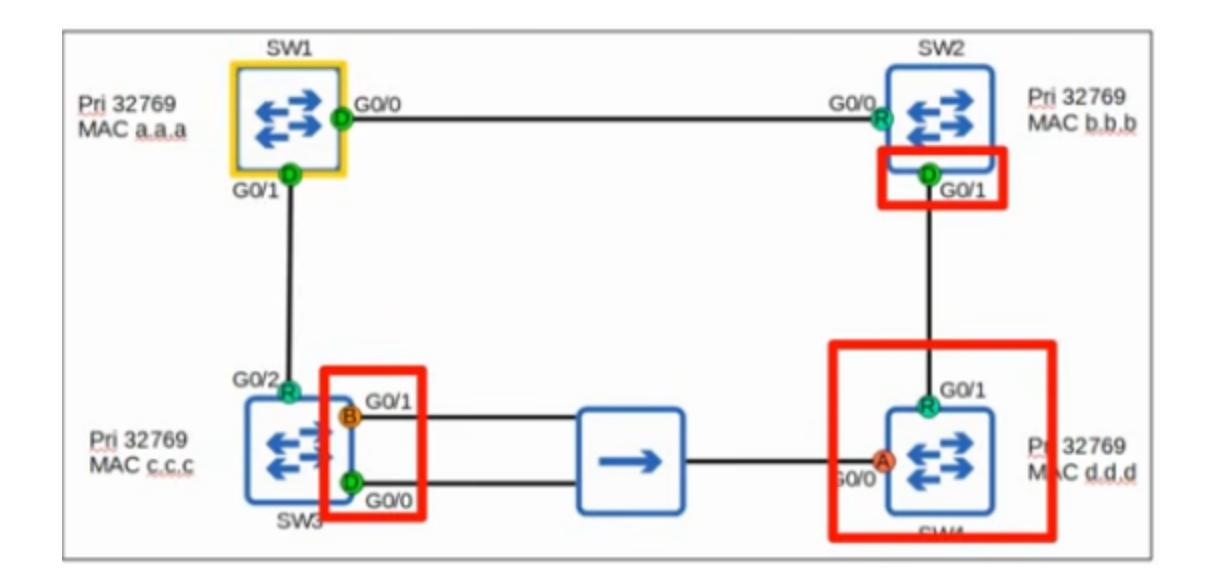
Example: If SW4 was running classic STP, SW2 and SW3 would make their interfaces connected to SW4 run in classic STP mode, but their interfaces connected to SW1 would remain in rapid STP mode.
RSTP BPDU — Differences from Classic STP
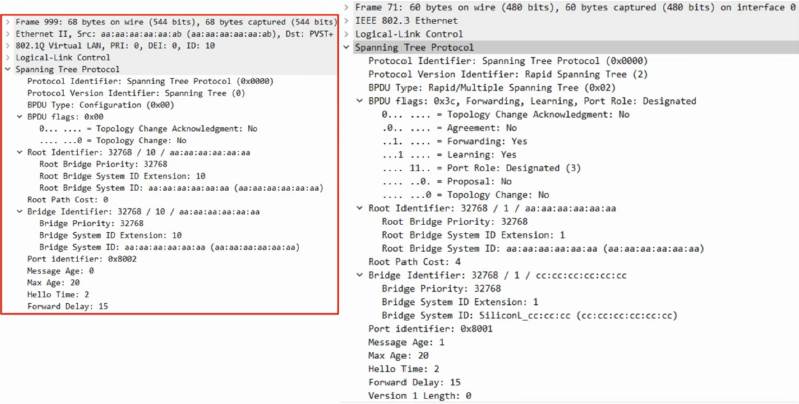
Most of the RSTP BPDU remains unchanged from classic STP, but there are key differences to know. (You do not need to memorize the full BPDU for the CCNA — just know the key aspects and what is included in it.)
Key Differences
1. Protocol Version

Classic STP: Version 0

Rapid STP: Version 2
2. BPDU Type

Classic STP BPDU uses a BPDU type of 0

Rapid STP BPDU uses a BPDU type of 2
3. BPDU Flags

Classic STP uses only 2 bits of the BPDU flags (the 1st bit and the 8th bit)
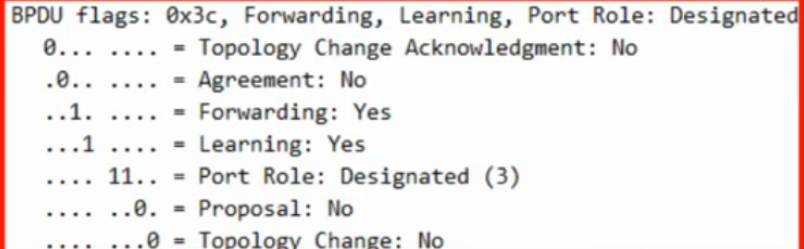
- Rapid STP uses all 8 bits
- These flags are used in the negotiation process that allows rapid STP to converge much faster than classic STP
4. BPDU Origination
- Classic STP: Only the root bridge originates BPDUs; other switches simply forward the BPDUs they receive
- Rapid STP: ALL switches originate and send their own BPDUs from their designated ports
RSTP BPDU Differences — BPDU Aging and Topology Changes
All Switches Send Their Own BPDUs
All switches running rapid STP send their own BPDUs (as previously mentioned)
Faster BPDU Aging
- Classic STP: A switch waits 10 hello intervals (20 seconds) before considering a neighbor lost
- Rapid STP: A switch considers a neighbor lost if it misses 3 BPDUs (6 seconds)
MAC Address Flushing
- When a neighbor is considered lost, the switch will flush (delete) all MAC addresses learned on that interface
- Reason: The neighbor is down, so the switch knows it can't reach anything through that interface anymore
Topology Change Example
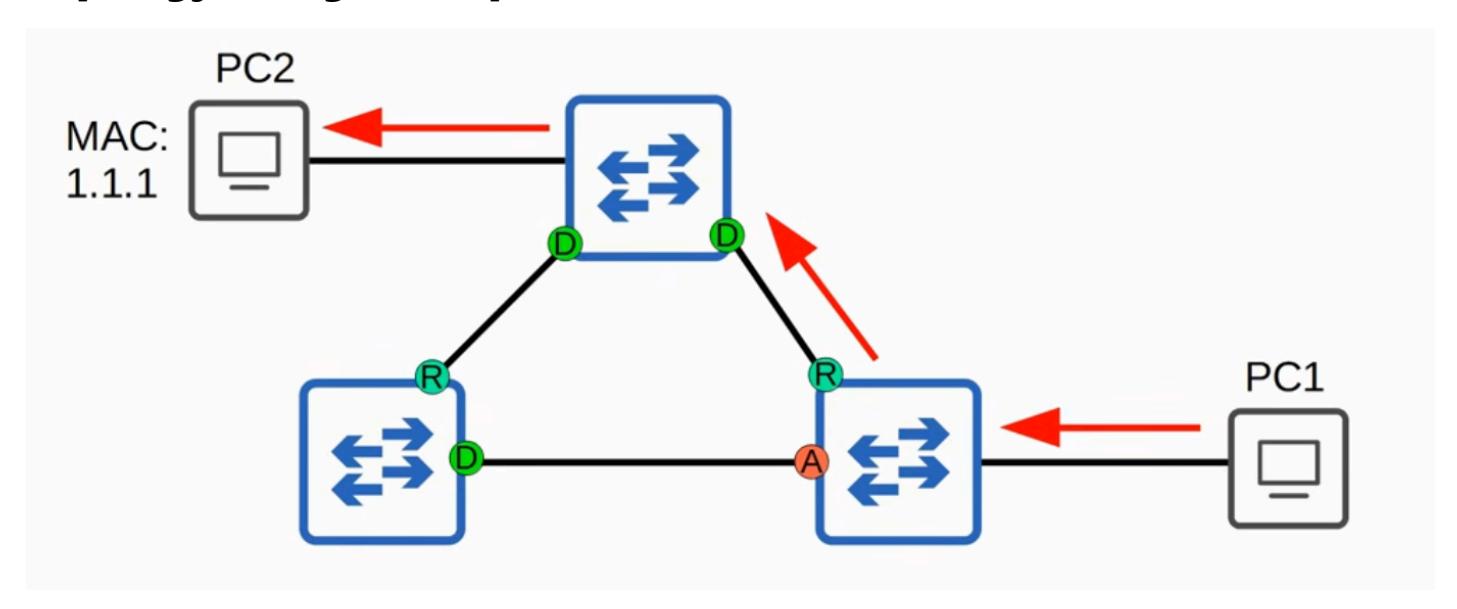
Normally, traffic from PC1 to PC2 follows a direct path between switches
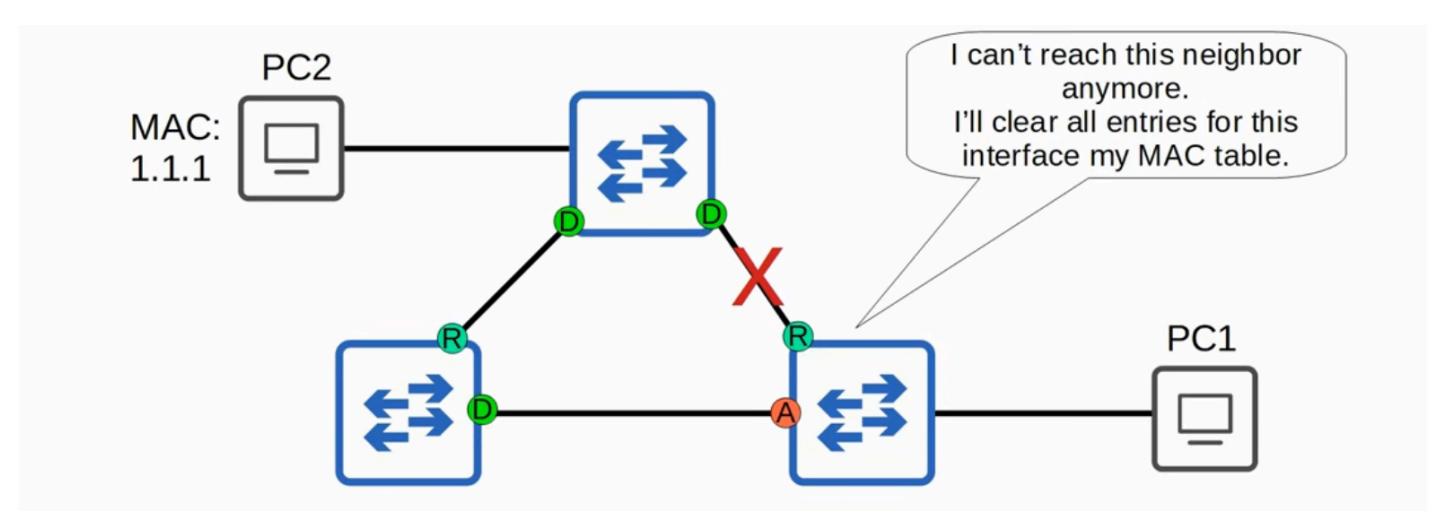
- If that connection is cut off:
-
- The switch thinks: "I can't reach this neighbor anymore"
-
- It clears all entries for that interface from its MAC table
-
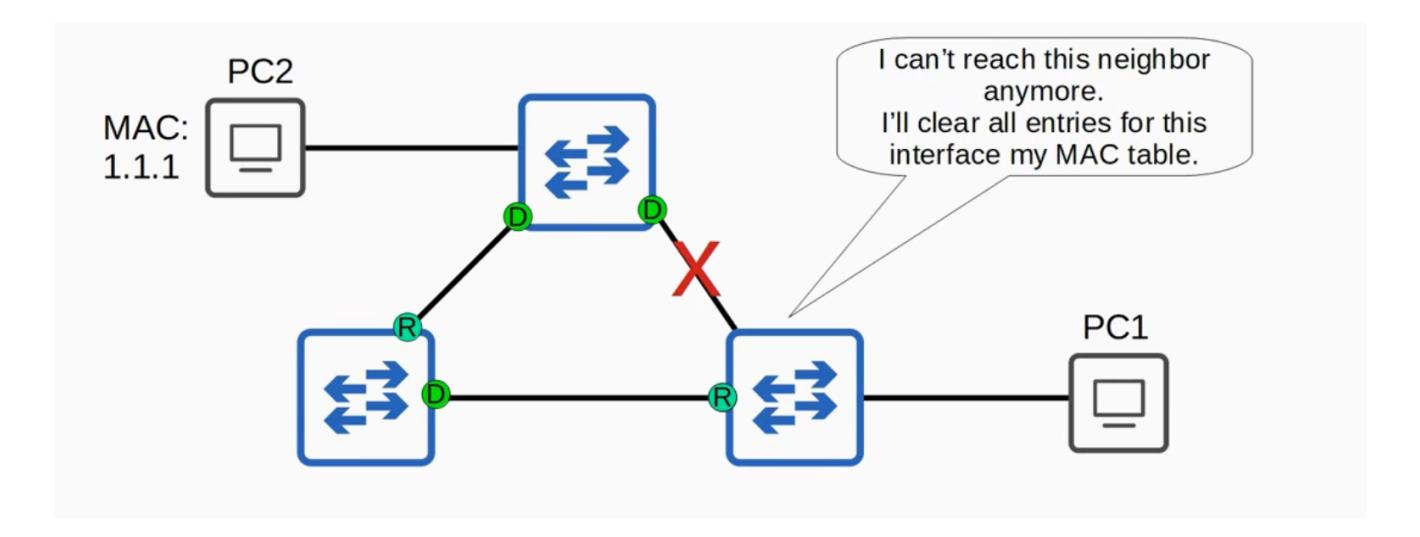
- Its other interface becomes the root port
-
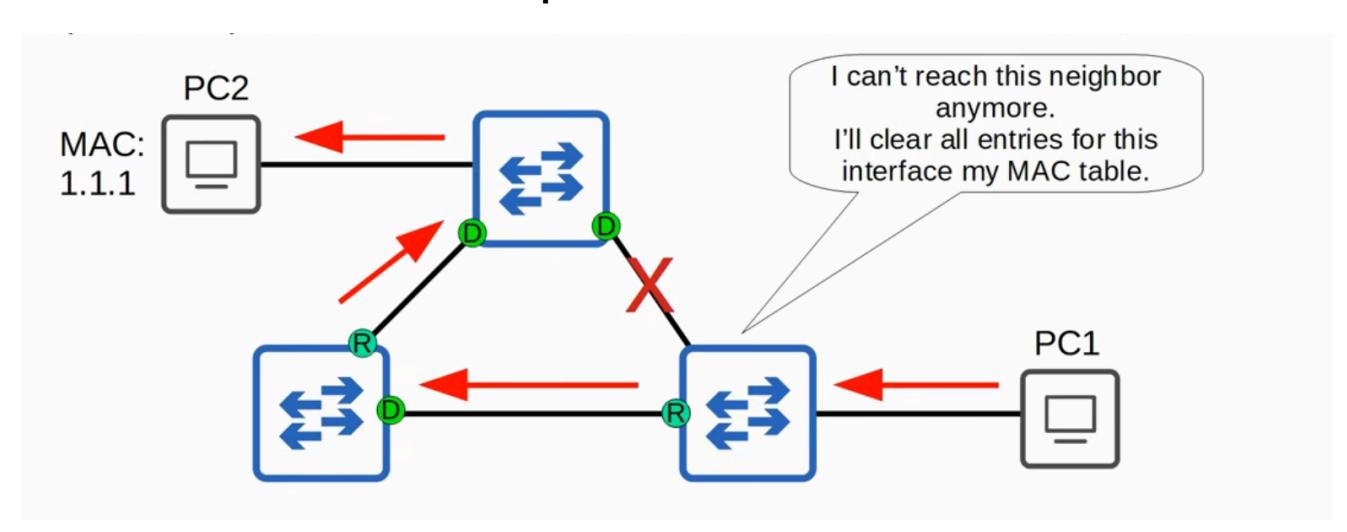
- If PC1 wants to send traffic to PC2 again, it goes through the normal process of flooding until the MAC address is learned on the new interface
-
- Traffic will now follow the new path
There is more depth that could be covered regarding how topology changes are handled in rapid STP, but it's not necessary for the CCNA. If you pursue your CCNP or CCIE, you'll have to study these processes more in depth.
RSTP Link Types
Overview
RSTP distinguishes between three different link types. Don't confuse these link types with spanning tree port roles or port states. The point-to-point and shared link types distinguish between fulland half-duplex connections, and the edge type is a port that uses portfast.
Edge Link Type
- A port connected to an end host
- Moves directly to forwarding without negotiation
- This is the PortFast functionality built into RSTP (another classic STP optional feature incorporated into RSTP, alongside UplinkFast and BackboneFast)
- Because there is no risk of creating a loop, they can move straight to the forwarding state without the negotiation process
- Configured by enabling PortFast on the port (same command as classic STP): spanning-tree portfast
- PortFast and an RSTP edge port are the same thing
- Which ports are edge ports?
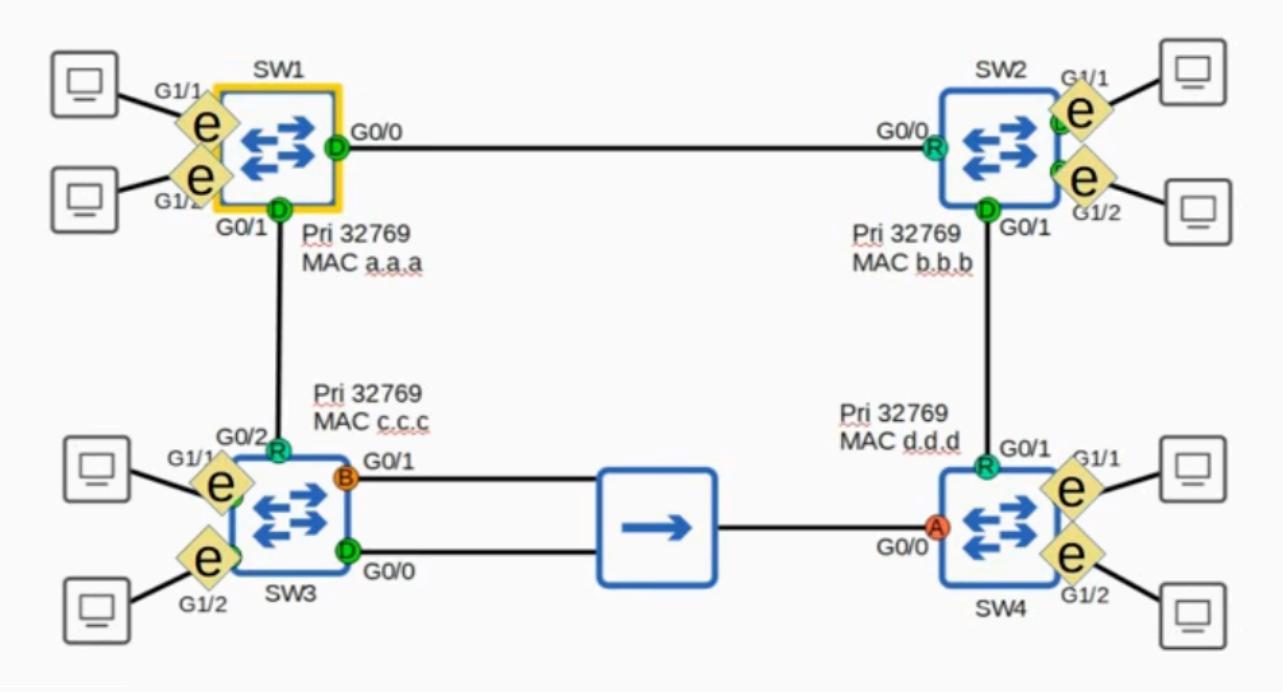
All ports connected to end hosts (PCs)
Point-to-Point Link Type
- Ports that connect directly to another switch
- Because they connect to a switch (not a hub), they function in full-duplex mode
- You don't need to configure this the switch detects that it is connected directly to another switch and will operate in full-duplex as a point-to-point port
- Manual configuration (if needed): spanning-tree link-type point-to-point
- Which ports are point-to-point?
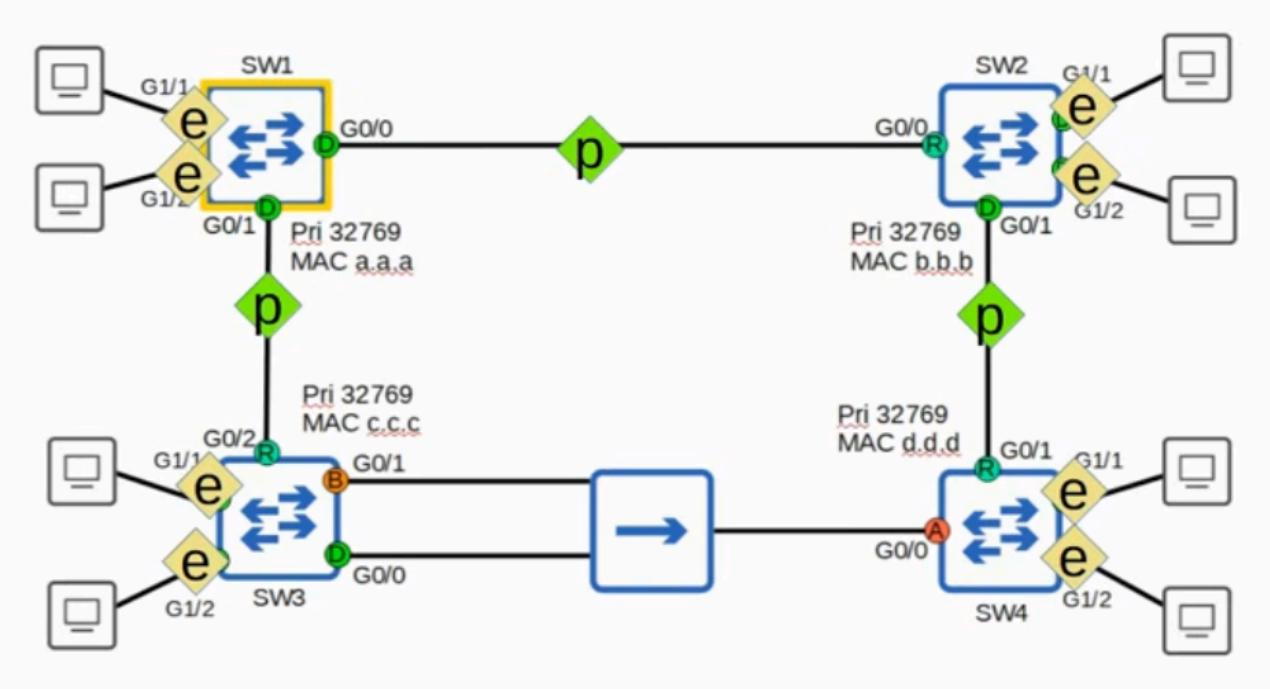
The direct connections between two switches
Shared Link Type
- A connection to a hub
- Due to the nature of hubs and the likelihood of collisions, these links must function in halfduplex
- You don't need to configure this the switch will detect it
- Manual configuration (if needed): spanning-tree link-type shared
- You will probably never see this link type in real networks hubs are old technology that have been fully replaced by switches
- Which ports are shared?
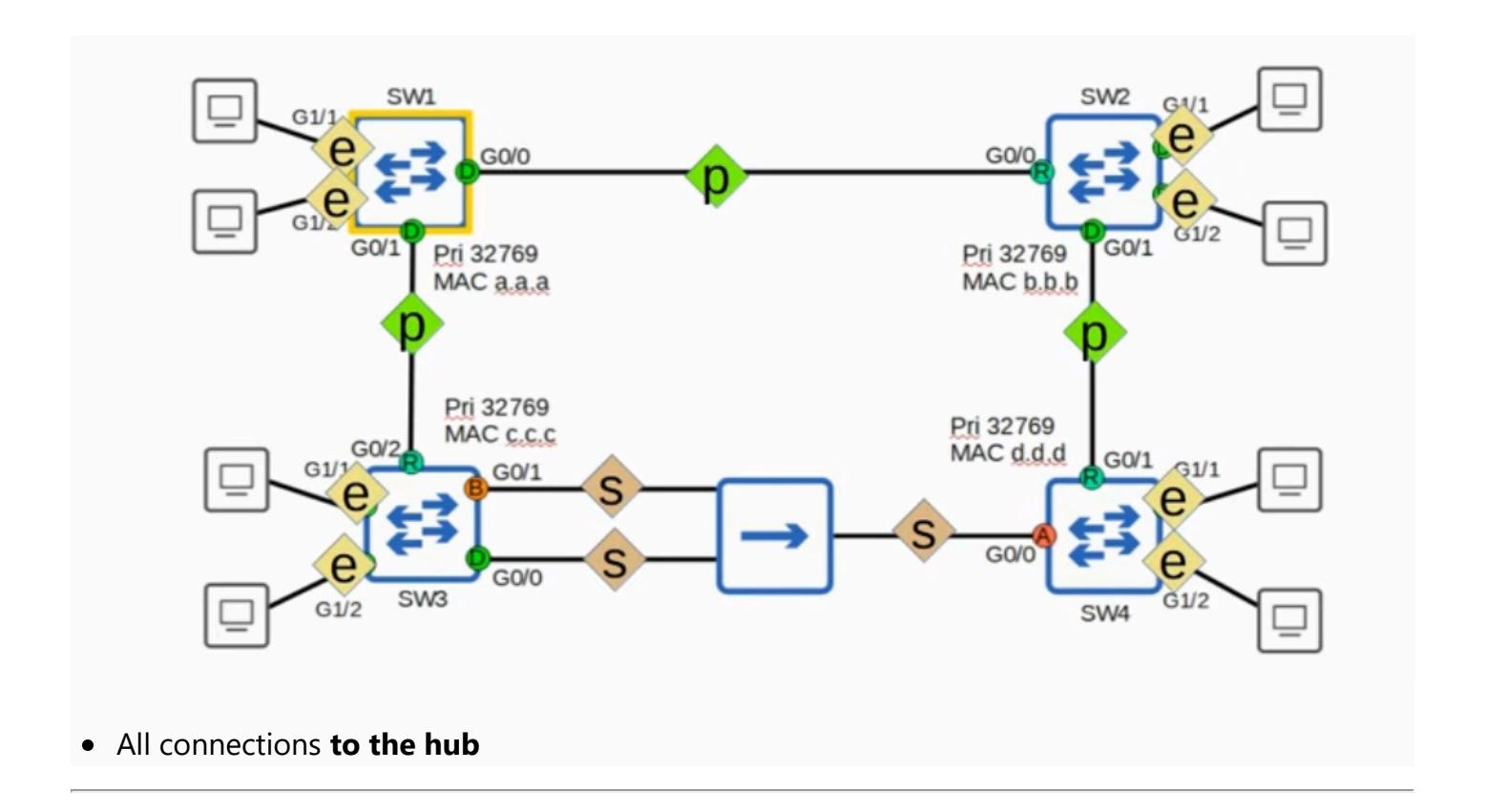
RSTP Summary — Quick Review
STP Versions
| Standard | Cisco Version | Key Feature | |||
|---|---|---|---|---|---|
| 802.1D (Classic STP) | PVST+ | Separate instance per VLAN | |||
| 802.1w (Rapid STP) | Rapid PVST+ | Separate instance per VLAN + fast convergence | |||
| 802.1s (MSTP) | (No Cisco version — industry standard is used) | Group multiple VLANs into instances |
Rapid STP Overview
Evolution of classic STP, not a revolution
- Uses a negotiation process instead of timers to rapidly move ports to forwarding and adapt to topology changes
- Specific details of the negotiation process are not necessary for the CCNA
RSTP Port States (3 total)
| State | Description | ||
|---|---|---|---|
| Discarding | Replaces blocking, listening, and disabled states | ||
| Learning | (Same as classic STP — often skipped due to built-in features like UplinkFast and BackboneFast) | ||
| Forwarding | (Same as classic STP) |
RSTP Port Roles (4 total)
| Role | Description | |
|---|---|---|
| Root | Same as classic STP | |
| Designated | Same as classic STP | |
| Alternate | Discarding port receiving a superior BPDU from another switch (the usual case) | |
| Backup | Discarding port receiving a superior BPDU from an interface on the same switch (only occurs via a hub — rarely encountered) |
Classic STP Optional Features Built into RSTP
- UplinkFast built into RSTP (detailed knowledge not required for CCNA)
- BackboneFast built into RSTP (detailed knowledge not required for CCNA)
- PortFast built into RSTP via the edge port function (you do need to know PortFast for the CCNA)
RSTP BPDU Key Points
- Protocol version: 2 (classic STP uses version 0)
- All switches originate and send their own BPDUs (classic STP: only the root bridge originates BPDUs)
RSTP Link Types
| Link Type | Connection | Configuration |
|---|---|---|
| Edge | Connected to an end host | spanning-tree portfast |
| Point-to point | Connected directly to another switch (full duplex) | Auto-detected, or spanning-tree link-type point-to point |
| Shared | Connected to a hub (half duplex) | Auto-detected, or spanning-tree link-type shared — rarely seen in real networks since hubs are no longer used |
Reinforce Your Knowledge
$ ./quiz — Rapid Spanning Tree Protocol (RSTP)
question 1/50score: 0/50Q1.What is the key reason RSTP is considered superior to classic STP?
0/50 answered
$ ./flashcards — Study Deck
card 1/39seen: 0/39# front · click or press space to flipRapid STP is IEEE [ ... ]# back · answer802.1wagain:0good:0easy:0